
A good weather station does more than tell you whether to grab a jacket. The right unit tracks barometric pressure trends, logs outdoor humidity from a remote sensor, and gives you a heads-up hours before a cold front rolls in. Gardeners, anglers, and anyone who plans around outdoor weekends tend to get the most from a station that updates often and shows pressure history at a glance. This list covers four solid picks across different budgets and feature sets, from Wi-Fi-connected prosumer displays to simple bedside units. Each one brings something different to the table, so match the profile to your space and how deep you want to go.
The Choices Worth Comparing
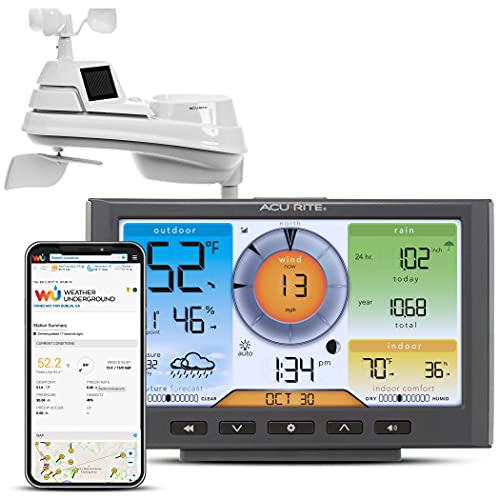
AcuRite Iris (01540) Wi-Fi Weather Station
Zivron Wireless Weather Station with Remote Sensor

U UNNI Wireless Atomic Weather Station (Black)
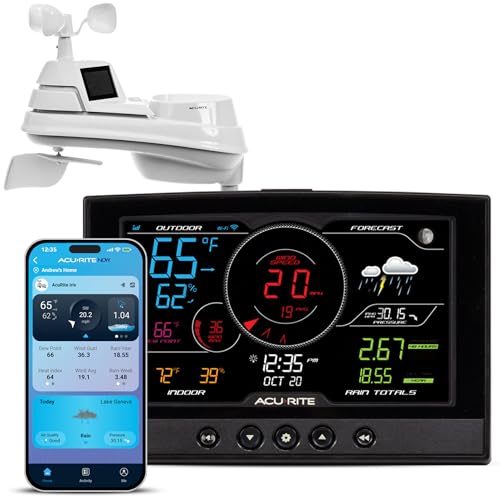
AcuRite Iris (01544) Direct-to-Wi-Fi Weather Station
Why These Options Stand Out
The AcuRite Iris sits at the front of the pack for hobbyists who want a real instrument rather than a glorified clock. Unlike the simpler units that just broadcast temperature, this one pairs an indoor display with an outdoor multi-sensor array that reads pressure, temperature, humidity, and rainfall from one roof-mounted mast.
You connect the console to your home network, and readings upload automatically to Weather Underground. For most backyards, that data feed turns a passive display into a personal weather log you can revisit months later.
Practical Advantages
- Outdoor array tracks pressure, temperature, humidity, and rain in one unit
- Wi-Fi upload to Weather Underground builds a long-term personal archive
- Color display separates current conditions from 12-hour forecast tiles
- Pressure trend arrows help you spot a falling barometer before a storm
Things To Consider
- Outdoor sensor needs a clear line of sight to the console, so placement matters
- Initial Wi-Fi setup can be finicky if your router separates 2.4 and 5 GHz bands
Who It Suits Best
This is the right call for someone who wants a serious home weather log without stepping up to a four-figure professional rig.
Where Another Pick Suits Better
Wind speed is not the headline here, so the AcuRite Iris (01544) Direct-to-Wi-Fi Weather Station is a better fit if you specifically need anemometer readings.
The Zivron takes a different route than the AcuRite units. Where those lean on outdoor sensors and network features, this one centers the experience on a generous 7.5-inch HD VA display that you actually want to look at.
Compared to the Iris 01540’s more utilitarian layout, the Zivron feels like a piece of home decor first and a weather tool second. The included wireless remote still tracks outdoor temperature and humidity, which is enough for most households.
Everyday Perks
- VA display panel reads cleanly from across the room
- Five brightness settings help in bedrooms at night
- Wireless remote handles outdoor temperature and humidity with no wiring
- Pressure trend reading joins standard forecast icons on screen
Points To Note
- No rain or wind sensor, so outdoor coverage is limited to temp and humidity
- No Wi-Fi, which means no online logging or remote viewing
Key Specs
Right Fit For
Anyone who wants a clean, glanceable display on a desk or shelf and does not need remote logging will get on well with the Zivron.
Skip It When
If your goal is multi-day data history or online sharing, the AcuRite Iris (01540) Wi-Fi Weather Station is the stronger tool.
The U UNNI goes wide on readouts, covering dew point, heat index, comfort indicators, tide data, and moon phase on top of the usual pressure and humidity figures. That makes it unusually versatile for a console in this price bracket.
Where the Zivron focuses on display quality, this one focuses on data variety. An atomic clock signal keeps the time locked without manual adjustment, which is a small but appreciated touch.
Benefits That Matter
- Dew point and heat index readings add context beyond basic temperature
- Tide and moon phase data is a rare find in this category
- Atomic clock keeps time accurate without setting
- Adjustable brightness spans a wide range for bedroom or office use
- Remote sensor pairs wirelessly without complicated setup
Worth Noting
- Atomic clock signal can be weak indoors in some regions, so reception depends on placement
- No wind or rain sensor included, which limits outdoor coverage
Who Will Love This
Coastal residents, gardeners, and anyone who reads dew point before deciding whether to mow the lawn will appreciate the extra data layers here.
A Better Fit Elsewhere
If you specifically need barometric pressure paired with rainfall logging, the AcuRite Iris (01540) Wi-Fi Weather Station is the more complete instrument.
The Iris 01544 takes the AcuRite platform and pushes it further. Compared to the 01540 covered earlier, this model adds a dedicated anemometer (a sensor that measures wind speed and direction) to the outdoor array, which turns the system into a more complete backyard instrument.
You still get direct-to-Wi-Fi upload, in-unit barometer, and color display. For most homeowners, that combination covers every reading they’d realistically want from a station sitting on the kitchen counter.
Real Benefits
- Anemometer captures both wind speed and direction in real time
- In-unit barometer adds a stable indoor pressure reference
- Direct Wi-Fi link removes the need for a bridge device
- Wireless rain and temperature readings round out the outdoor array
Room For Improvement
- Outdoor mast needs proper mounting hardware, which is sold separately in many cases
- Premium pricing reflects the expanded sensor set
- Display console software updates depend on a stable network connection
Technical Highlights
Built With In Mind
Backyard weather watchers who want wind data alongside pressure and temperature will find this is the most complete pick on the list.
Look Elsewhere When
You mainly want a clean bedside readout without extra outdoor hardware, in which case the Zivron Wireless Weather Station with Remote Sensor does the job at lower cost.
What Matters Most Before Choosing Digital Barometers
Start with where the unit will live. A console mounted in a sunny window reads pressure poorly because the sensor warms from radiant heat. Aim for a wall or shelf away from direct sun, and place the outdoor sensor in open air, ideally four to six feet off the ground and out from under eaves.
Next, decide how much outdoor instrumentation you actually want to maintain. Pressure, temperature, and humidity need almost no upkeep. Rain gauges and anemometers add accuracy but require periodic cleaning and a stable mount.
Range and connectivity matter too. Wireless remotes typically broadcast 100 to 300 feet in open air, but walls and metal siding cut that range quickly. Run the console through its pairing step before committing to a wall mount.
Factors That Set Models Apart
Pressure sensor quality varies more than people expect. A basic chip drifts in humid months, while a sealed barometric sensor keeps readings stable year-round. If you care about forecasting accuracy, look for a console that shows pressure trend arrows alongside the numeric value.
Display readability is easy to overlook. A dim LCD on a bedside table becomes useless at night, while a glare-heavy glossy panel washes out near a window. The Zivron’s adjustable VA panel is a good example of how display choice affects daily use.
Finally, think about Wi-Fi and data. A unit that uploads to Weather Underground gives you a personal archive, but it also means a stable home network and a willingness to set up an account. A standalone console is simpler and works without any internet at all.
Pitfalls Shoppers Hit
Many shoppers pick a station based purely on the display photo, then discover the outdoor sensor range falls off once a stucco wall sits between them. Test the signal strength in your real installation spot before drilling any holes.
Another common miss is ignoring replacement battery costs. Wireless remotes run on AA or AAA cells that you will replace roughly twice a year. Cheap batteries leak and ruin the sensor, so name-brand cells pay off over time.
A third trap is assuming every “weather station” includes wind and rain. Most do not. If those readings matter, confirm the spec sheet before ordering.
Where The Extra Money Goes
Higher-tier weather stations spend the difference on sensor stability and outdoor hardware. A better barometric sensor holds its calibration through humidity swings, and a quality anemometer survives years of wind and weather without drift.
Premium models also tend to bundle more outdoor instruments out of the box. Buying them later as add-ons often costs more than stepping up to a fuller package up front. The upgrade pays off when you actually want wind and rain data on day one rather than six months after purchase.
Frequently Asked Questions
What does a digital barometer actually measure? A digital barometer measures atmospheric pressure using an internal sensor and displays the reading in inches of mercury, millibars, or hectopascals. Pressure trend arrows help you spot weather changes before they arrive.
Do I need Wi-Fi for a digital barometer? No. Wi-Fi is only useful for online logging, remote viewing, or uploading to services like Weather Underground. The barometer itself reads pressure locally with no network required.
How accurate are consumer digital barometers? Most consumer units read within 0.05 to 0.1 inches of mercury under stable indoor conditions. Accuracy drops with rapid temperature swings, which is why placement away from direct sunlight matters.
Where should the outdoor sensor be placed? Mount the remote sensor in open shade, four to six feet off the ground, and away from walls or metal surfaces. That placement keeps readings consistent through day and night.
How often do wireless sensors need new batteries? Most wireless remotes run roughly six to twelve months on a set of quality alkaline cells. Lithium cells stretch that window in cold climates where alkalins tend to struggle.
Bottom Line
A home weather station earns its place by giving you reliable pressure trends and outdoor conditions you can actually trust. Match the sensor set to the data you will use, and you end up with a console that quietly improves every outdoor plan you make.